
Micro-Credentials and Digital Badging

Learn about current Microcredentials and Digital Badges available at Yavapai College:
Explore YC Digital Badges ↗Yavapai College’s Micro-Credentials and Digital Badging are designed to offer you targeted education in skills sought by employers. These short, focused programs are designed to meet specific industry needs, providing relevant skills that can be immediately applied in the workforce.
What is a Micro-Credential?
A Micro-Credential verifies mastery of a specific skill or area of knowledge. Unlike traditional degrees or certifications, Microcredentials are typically earned through single courses, workshops, or training programs. They can often be stacked towards a larger credential, such as a certificate or degree.
Benefits of Micro-Credentials include:
- Targeted skill development
- Enhanced career opportunities
- Recognize and validate learning
- Flexible learning paths
- Can be shared digitally on social media platforms such as Facebook, Twitter, and LinkedIn
What are Digital Badges?
Digital Badges serve as a visual representation of a credential, containing detailed information about the skills acquired, the issuing organization, and the earning criteria. Badges are issued through Parchment Digital Badges. and can be shared on social media platforms such as LinkedIn, embedded in resumes, added to digital portfolios, or included in email signatures to demonstrate verified competencies.
Yavapai College awards digital badges for microcredentials, co-curricular activities, professional development courses, and workforce development and training programs. Each badge has a unique design that represents the achievement.
The colors of Yavapai College's digital badges were selected from an elevation map to show the elevation of competencies from knowledge and awareness to skills and abilities.
Frequently Asked Questions
The resources below include more information about microcredentials, digital badges, and how to use them. Select the arrows to expand each section.
How are microcredentials different from traditional degrees and certificates?
Unlike traditional degrees or certifications, microcredentials are typically earned through a short series of courses, workshops, or training programs that focus on specific skills and competencies. You'll often complete assessments such as quizzes, projects, or peer and instructor evaluations to demonstrate what you've learned.
A microcredential can be an additional, alternate, complementary, or official component of a formal qualification such as a degree or certificate.
| Feature | Microcredential | Certificate | Degree |
|---|---|---|---|
| Focus | Specific skill or competency | Series of related skills or competencies | Broad field of study with depth and breadth |
| Time to Complete | Can be a single training or up to a few months, depending on the complexity of the skill | Several months to 1 year | 2–4+ years |
| Format | Often short, targeted courses or projects; can be online or in-person | Multiple courses in a focused area | Many courses across general education and major requirements |
| Recognition | Digital badge (shareable online) | Physical or digital certificate | Diploma |
| Purpose | Upskilling, reskilling, or adding a specialized skill to existing knowledge | Career preparation or advancement in a specific area | Broad academic preparation and professional qualification |
| Stackable? | Yes, often part of a pathway leading to certificates or degrees | Sometimes stackable toward a degree | N/A (already the highest in the stack for that path) |
Microcredential vs. Certificates and Degrees
Why should I earn microcredentials?
Let's consider the example of learning to ride a bike. Just like learning to ride a bike step-by-step helps you build skills such as balance, coordination, and confidence, microcredentials matter because they break down complex learning into focused, observable skills.
Microcredentials are referred to as stackable when they accumulate and can be applied toward larger goals, such as certificates or degree programs. This creates clear pathways to progress at your own pace, with flexibility to tailor learning based on your career goals and personal interests.
In the example below from Prince George’s Community College, four microcredentials stack into a Hospitality Leadership Certificate. This certificate can then lead to increased earning potential and employment opportunities as a Hospitality Services Manager, as well as continued learning opportunities, such as a Hospitality Management Certificate or an Associate's degree in Hospitality Services.
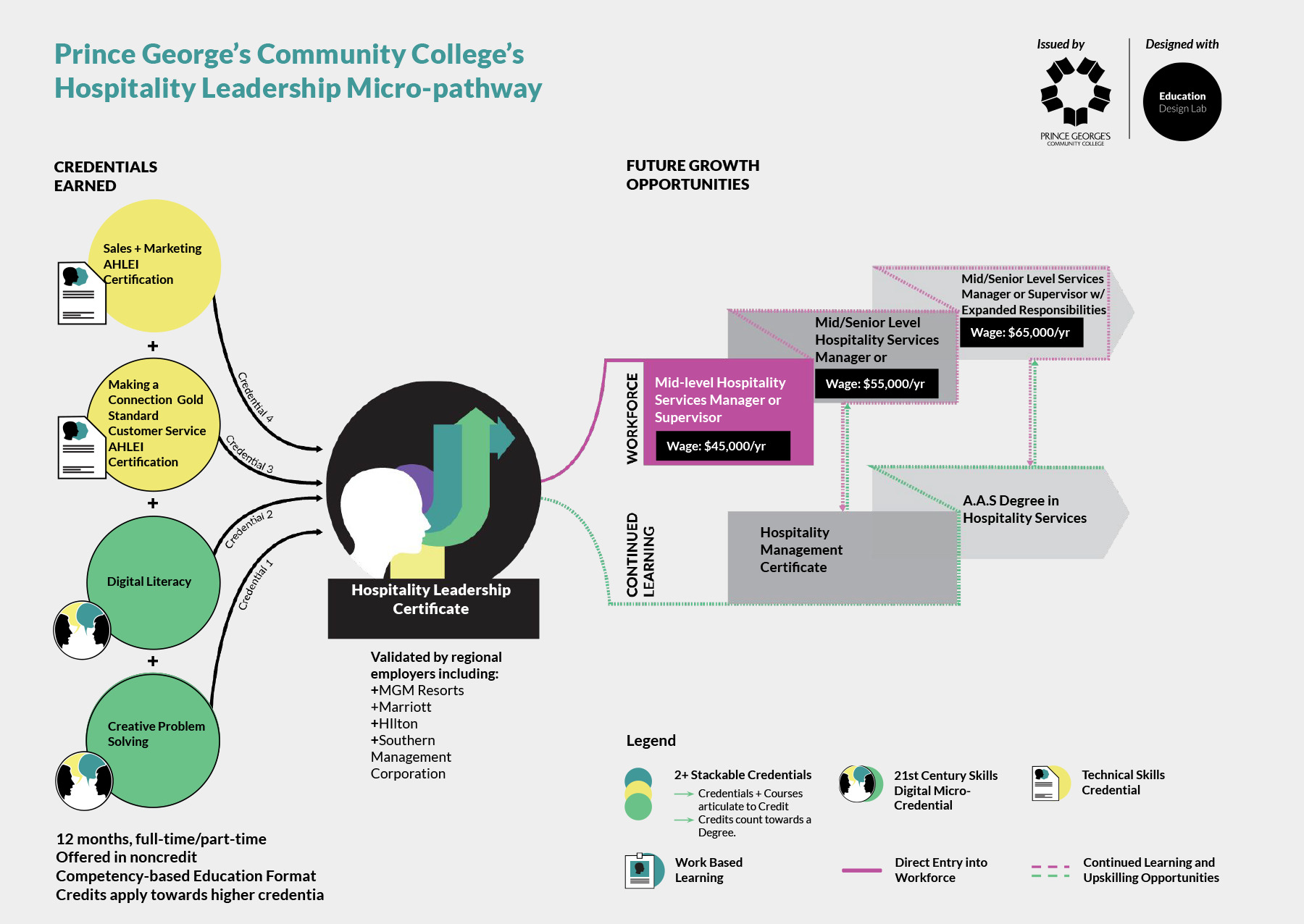
Stackable microcredential pathways like this one will be coming to Yavapai in the next year.
In the end, the key benefits of earning microcredentials are:
- Microcredentials give you visible proof of your progress, even before you complete a full degree.
- They help you stand out to employers by showcasing the exact skills you bring to the table.
- They keep your education flexible so you can respond to changes in your career or industry.
- Stackable pathways offer a practical, step-by-step path to long-term success.
Parchment Digital Badges - Claim It, Share It, Use It!
At Yavapai College, microcredentials are awarded through the Parchment Digital Badges platform. The resources below will help you set up your Parchment Digital Badges account, claim, and share your digital badges.
How do I claim my digital badge?
- When you are awarded a digital badge upon successful completion of a microcredential, you will receive an email from Yavapai College <noreply@badgr.com>.
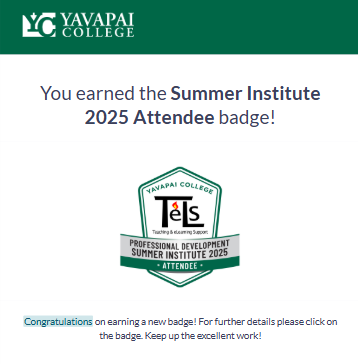
- Select Go to the Badge to go to Parchment Digital Badges. You can also download an image of your digital badge.
- You will be prompted to Sign In or Create Account.
- If you are new to Parchment Digital Badges, you can create an account using various social sign-on options or your Yavapai College account.
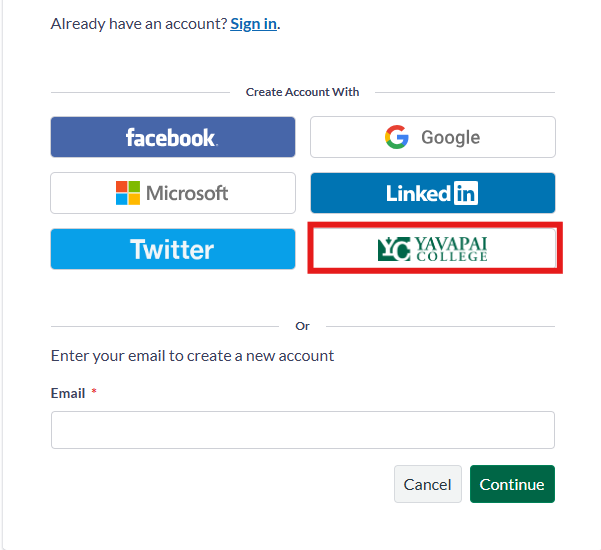
- It is important to sign in using the email address that the digital badge was sent to. You can add additional email addresses and merge your accounts later to keep all your digital badges in one place.
- Your first time logging in, you will see a Welcome page. Scroll down to the bottom of the page and select View my badges.

- Select the badge to view additional information included with the digital badge, such as the issuer, the date it was issued, a description, achievement type, and earning criteria.
How can I share my digital badge?
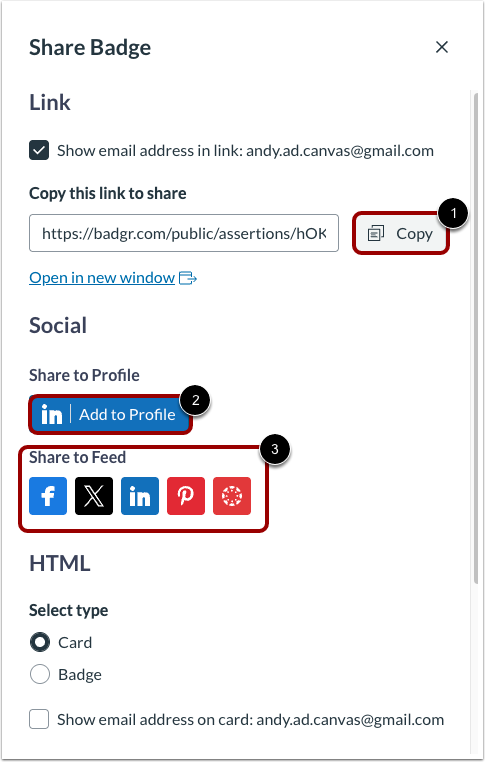
- In the Badges tab, click the Options icon, then click the Share link.

- To share a link to your earned badge, click the Copy button. To add the badge to LinkedIn, click Add to profile. To post to social media, click the desired social icon.
Your Digital Badge Backpack
Your Parchment Digital Badges Backpack is like a digital wallet that holds all of your credentials, keeping them in one place.
- To view your Parchment Digital Badges Backpack, select the Select Space drop-down at the top of the screen, then choose Account under Canvas Badges Personal.
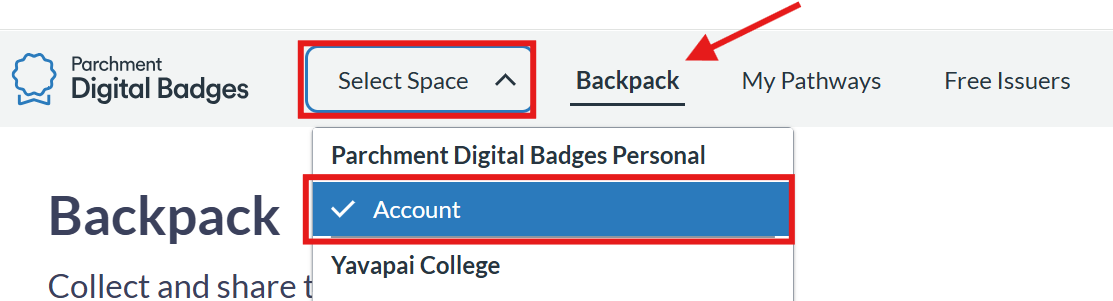
- From here, you can create collections in your Backpack. Collections let you organize and share specific groups of badges (e.g., Job Applications, Internships, Portfolios, etc.).
- Job Applications - Group relevant badges together to highlight skills for a position.
- Internships - Share targeted badges demonstrating readiness for the role.
- College or Program Applications - Showcase credentials that support academic goals.
- Portfolio - Organize badges by project, skill type, or course.
- Networking - Share collections on LinkedIn or other platforms.
- Skill Progression - Display a sequence of badges (beginner → advanced).
- Competitions or Scholarships - Highlight achievements relevant to awards.
- Volunteer Opportunities - Organize badges that show leadership or service skills.
- A collection of badges can be shared just like an individual badge.
Your Parchment Digital Badges Backpack is a digital wallet that holds your credentials in one place. Use collections to organize badges for sharing (job apps, portfolios, internships, etc.). A collection can be shared just like an individual badge.
To access: open the Select Space dropdown → choose Account under Canvas Badges Personal.
How do I include my digital badge on a resume or talk about it in an interview?
You've claimed your digital badge — now what?
Microcredentials are proof of skills and achievements that can help you stand out to employers, schools, and professional networks. Below are tips for getting the most from your micro-credentials:
1. Add Your Digital Badge to Key Places
Résumé:
- Include the microcredential name under Education or Skills.
- Mention the awarding institution and the date earned.
- Briefly describe the skill or competency it represents (if space allows).
- Always include a link to your digital badge if possible.
LinkedIn:
- Add your badge to the Licenses & Certifications section.
- Use the badge’s link from Parchment so employers can view it.
- Share directly to LinkedIn from Parchment Digital Badges.
E-Portfolio or Website:
- Embed your badge on your “About Me” or “Skills” page.
- Include a short description of the skill and how you’ve applied it.
2. Talk About Your Badge in Interviews
- Be specific: Explain what you learned and how you demonstrated mastery.
- Give examples: Share a project, task, or achievement tied to the skill.
- Connect the dots: Show how the skill benefits the role you’re applying for.
Example interview answer:
3. Example Résumé Bullet Points Featuring Micro-Credentials
- Earned Data Analysis Fundamentals microcredential: completed training in Excel, pivot tables, and data visualization techniques.
- Achieved Digital Marketing Basics microcredential: applied SEO and social strategies to increase campaign engagement by 15%.
- Awarded Customer Service Excellence microcredential for demonstrating effective communication, conflict resolution, and client satisfaction strategies.
Contact
For additional support or questions about microcredentials, email microcredentials@yc.edu.
