A waitlist does not guarantee a seat
You will receive an offer only if a registered student leaves the class and the seat reaches your position in line.
When a class is full, an available waitlist lets you reserve a place in line for the next open seat. Your position is based on the date and time you join the waitlist.
Registration help
When a class is full, an available waitlist lets you reserve a place in line for the next open seat. Your position is based on the date and time you join the waitlist.
When a seat becomes available, YC sends a notification to your YC email account. You must register for the class within 24 hours of the notification time.
Notifications may arrive during the day, in the evening, on weekends or on holidays. Check your YC email every day while you are on a waitlist.
Before joining
You will receive an offer only if a registered student leaves the class and the seat reaches your position in line.
After receiving an offer, you must change your registration status from Waitlist to Web Registered.
A waitlisted class does not count toward enrollment status, financial aid, attempted credits or program requirements.
If the offer expires, the seat moves to the next student. You may rejoin only if space remains on the waitlist.
Step one
Full classes display an alert in the Status column. When a waitlist is available, the status will also show the number of remaining waitlist spaces.
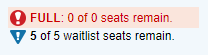
A blue triangle beside the waitlist count indicates a cross-listed course. The displayed count applies across the linked sections.
If the waitlist option does not appear, the course may not offer a waitlist or the waitlist may already be full. Select another section with an available seat when possible.
View registration self-helpStep two
Select the Add button. The course will appear as pending in your Enrollment Activity window.
Open the Action menu for the class and select Waitlist.
Select Submit and confirm that the class status has changed to Waitlisted.
The waitlisted course will appear on your schedule, but you are not enrolled in the class until you complete registration after receiving a seat offer.
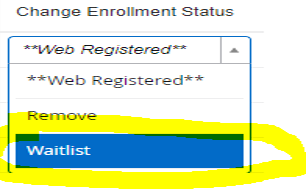
If you submit without selecting Waitlist, the system may return “Class is full. Waitlist available.” Select Waitlist from the Action menu and submit again.
Step three
The email notification does not enroll you. You must complete the registration change yourself before the expiration time shown in the message.
Waitlists expire on the Wednesday of the first week of the class start date. Remaining waitlisted students are removed within 24 hours after that deadline.
A student who receives a seat offer by the deadline still has the full 24-hour period stated in the notification to complete registration.
Common questions
No. You will be offered a seat only if space becomes available and the offer reaches your position on the waitlist. Registering for an open section is the only way to secure a seat immediately.
You may join waitlists for different courses. You may not join waitlists for multiple sections of the same course.
Remove yourself from the waitlist in Banner Self-Service. This allows other students to move forward and prevents an active offer from interfering with registration in another section of the same course.
No. Many full classes offer a waitlist, but some do not. Check the Status column during registration to see whether the option is available.
The system removes you from the waitlist and offers the seat to the next eligible student. You may rejoin the waitlist if space remains, but you will receive a new, lower position in line.
An available seat may be temporarily reserved for the next student on the waitlist. If that student does not register before the deadline, the seat moves to the next student. The class opens to general registration only when no eligible students remain on the waitlist.
In Banner Self-Service, locate the waitlisted course in Enrollment Activity, choose the removal option from the Action menu and submit the change.
Yes. Registration holds, prerequisites and other restrictions are checked when you join the waitlist and again when you attempt to register for an offered seat.
No. Tuition and fees are charged only after you successfully register for the class.
No. A waitlisted course does not count as attempted, enrolled or earned credit until you officially register for the class.
Registration availability can change quickly. Always confirm the final status of each course in Banner Self-Service.