Immersive Learning Lab
Explore virtual reality and immersive technologies in a dedicated space designed for collaborative learning and discovery.
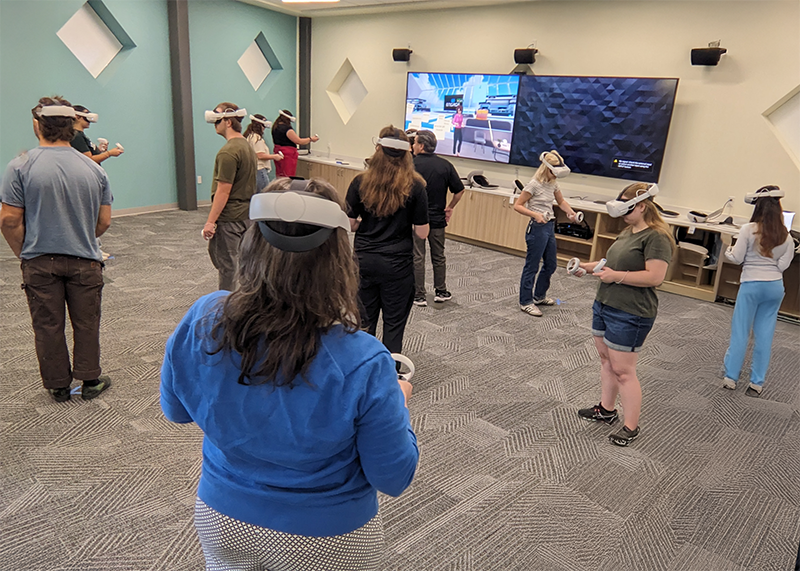
Immersive Learning Labs provide students and faculty with access to virtual reality (VR) technology in a safe, open environment free from physical obstacles.
As a VR space:
- Open, obstacle-free space – Safe movement area for ~20 students
- 35 Quest 2 headsets – High-quality standalone VR for individual or group use
- 8 large display screens – Cast VR experiences for viewing and discussion
- Lectern – YC computer or plug in your own device using USB-C or HDMI
- 8 large screens – Show instructor's screen around the room or plug in laptops using HDMI
- Zoom capture – Ceiling-mounted cameras and microphone to capture presenter or entire room
- Flexible furniture – 5 tables, 12 chairs. Create group stations or small classroom setup
Equipment and Features:
- 11 Quest 2 headsets – Standalone wireless VR for flexible use
- 2 98-inch monitors – Large-format displays for shared viewing
- Cast up to 8 headsets simultaneously
- HDMI input for external devices
- Ceiling-mounted microphones with AI – Intelligent audio system that focuses on individual speakers
- Wall-mounted speakers – Room-filling audio for immersive experiences
- HDMI connectivity – Connect laptops and other devices
- Open, obstacle-free space – Safe environment for movement and exploration
Our VR headsets provide access to a curated collection of educational applications and experiences across multiple disciplines:
- Geography and environmental science
- History and cultural studies
- Health sciences and anatomy
- Engineering and technical training
- Art and museum collections
- Language and cultural immersion
- STEM simulations and labs
Need specific content for your course? Contact CLI staff to discuss content recommendations and installation. immersive-learning@yc.edu
Faculty Reservations for a VR Lesson
Faculty members may request use of the Immersive Learning Lab for YC instructional purposes. All requests require review and planning with an educational technology instructional designer. This process can take 2-4 weeks depending on complexity and availability of content.
When you initiate a request, we will reach out to plan your VR lesson together.
Faculty or Staff Reservations
YC faculty and staff can reserve the Immersive Learning Lab for a non-VR class or other use. A limited number of chairs and tables are available.